

Rounded Frame#
The first example is based on that created by Bryan Oakley, a stalwart of StackOverflow. His original script created visible frames around entry and text widgets, example 05rounded_frame.py.

05rounded_frame#
from tkinter import Tk, PhotoImage, Text, StringVar
from tkinter.ttk import Style, Frame, Entry, Label

root = Tk()

img1 = PhotoImage("frameFocusBorder", data="""
R0lGODlhQABAAPcAAHx+fMTCxKSipOTi5JSSlNTS1LSytPTy9IyKjMzKzKyq
Ry/99NIz//oGrZpUUEAAOw==""")

img2 = PhotoImage("frameBorder", data="""
R0lGODlhQABAAPcAAHx+fMTCxKSipOTi5JSSlNTS1LSytPTy9IyKjMzKzKyq
J4744oZzXUEDHQxwN7F5G7QRdXxPoPkAnHfu+eeghw665n1vIKhJBQUEADs=""")

style = Style()
# img1 is frameFocusBorder, img2 is frameBorder - cross reference
style.element_create("RoundedFrame", "image", "frameBorder",
    ("focus", "frameFocusBorder"), border=16, sticky="nsew")

style.layout("RoundedFrame", [("RoundedFrame", {"sticky": "nsew"})])
style.configure("TEntry", borderwidth=0) # general handle widget class Entry

lab = Label(text="Dont't forget to click and hover\n \
also put a few letters in the entry and text").pack(pady=5)
frame = Frame(style="RoundedFrame", padding=10)
frame.pack(fill='x')

frame2 = Frame(style="RoundedFrame", padding=10)
frame2.pack(fill='both', expand=1)

tv = StringVar()
entry = Entry(frame, textvariable=tv)
entry.pack(fill='x')
entry.bind("<FocusIn>", lambda evt: frame.state(["focus"]))
entry.bind("<FocusOut>", lambda evt: frame.state(["!focus"]))
tv.set('Entry input here')

text = Text(frame2, borderwidth=0, bg="floral white", highlightthickness=0)
text.pack(fill='both', expand=1)
Note
For sanity's sake about 74 lines of image data have been ommitted. Only the first and last lines of the data file are seen above.
Discussion - Rounded Frame#
Since he is using encoded data there is no reference to a file, instead PhotoImage refers to this data directly. Normally we have no states in the frame widget so he introduces lambda functions tied into Entry FocusIn and FocusOut events. He is using 2 separate images, the first is where the frame's contents have focus, the second where it loses focus. Click within the upper and lower frames, see how the outer colour changes, also note that the frame has decidedly rounded corners and a shadow on the right hand and lower sides.
Let's remind ourselves about the layout and elements for frame:
>>>s.theme_use('default')
>>>s.layout('TFrame')
[('Frame.border', {'sticky': 'nswe'})]

>>>s.element_options('Frame.border') # only one component to query
('background', 'borderwidth', 'relief')
In our example script, Bryan created an extra state (focus) and changed the border, using the command style.element_create:
     style.element_create("RoundedFrame", "image", "frameBorder",
# he was working on "RoundedFrame" the style cross reference,
# then he added an image "frameBorder" our default or normal state
     ("focus", "frameFocusBorder"), border=16, sticky="nsew")
# next he added the state "focus" and set this to the image "frameFocusBorder"
# then changed the border to 16
The border size, 16, is important, it is the allowance needed to create the rounded corners and shadows, without this the resulting widget would look jagged. The single figure 16 is the equivalent of having (16,16,16,16), a border of 16 along all sides. The lower frame has obviously grown in comparison to the upper frame and looks pretty smart, both frames have the same style "RoundedFrame".
Now is a good time to have a look at the underlying image. To do this we will need to decode the coded image. Since the script is quite old it was assumed to be a gif image. (Use all the data lines of the coded image).:
import base64
with open ('frameFocusBorder.gif','wb') as f:
        decoded = base64.decodebytes(b"""
R0lGODlhQABAAPcAAHx+fMTCxKSipOTi5JSSlNTS1LSytPTy9IyKjMzKzKyq
.....  ## coninuation ##
Ry/99NIz//oGrZpUUEAAOw==""")
        f.write(decoded)
normal image |
focus image |
|---|---|
|
|


Working with the code from img1 (frameFocusBorder) of 05rounded_frame.py, we should see that an image file frameFocusBorder.gif is created, that is 64 by 64 pixels large. Load this on an image editor, zoom in so that the pixels are shown as squares and move your cursor to the centre of the corner, we then can see why we need to have a border of 16 all round.
Border 16 |
Border 12 |
Border 8 |
|---|---|---|
|
|
|
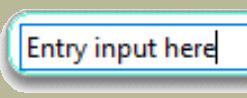
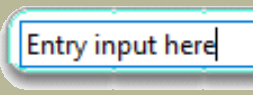
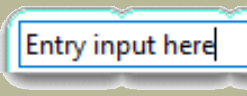
Reducing this figure to 8 say we will see about 13 indentations on the long side. A border of 12 will still show indentations, although not as pronounced, by 16 the indentations have disappeared altogether. Also look closely at the corners, the shadow affects the lower corner. It would seem that when a widget image needs to extend only the inner part of the image between the border extremities is utilised for the extension, in this case the middle 32 pixels of each side are used during an image extension.
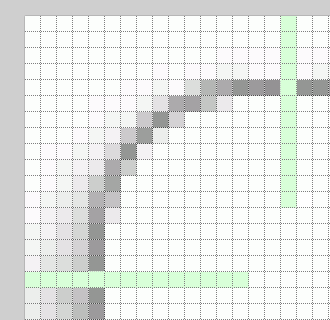
Top left hand corner showing 16 pixel distances from sides#
Think about what you have just seen, it's pretty awesome isn't it? That small
image was automagically enlarged to the required size with the barest of input,
apart from telling the widget to change itself by creating an element and
placing our image at the border we did not change a thing, the only sizing
command was the standard expand=1 found in pack.
What happens when we adapt the above method for a labelframe? What about the top part of the frame where the text is written between a visible frame? Will we need a special method to create the gap? Ah well, fools rush in where angels fear to tread. Run 05rounded_labelframe.py.
Rounded LabelFrame#

Only the element_create and layout parts have been shown.
s.element_create("RoundedFrame", "image", "frameBorder",
        ("focus", "frameFocusBorder"), border=16, sticky="nsew")
s.layout("RoundedFrame", [("RoundedFrame", {"sticky": "nsew"})])
The labelframe reacts well, we see the label sitting in the frame break, and the colour changes as a result of the program logic. The style.element_create and style.layout remain the same as for the frame example.
  import base64
  with open('borderGrey1.gif', 'rb') as f:
          encoded = base64.encodestring(f.read())
          print(encoded.decode('latin1'))
# 'latin1' contains all western characters but not the €
The grey image was modified to create a red widget which was then encoded.
Show/Hide Code 05rounded_labelframe.py
'''
Using 05rounded_frame.py to make a similar procedure for labelframe.

If necessary run within Idle or from command line
'''
from tkinter import StringVar, Tk, PhotoImage, Text
from tkinter.ttk import Style, LabelFrame, Frame, Entry, Label


root = Tk()
s = Style()
s.theme_use('default')
fr = Frame(root)
fr.pack(expand = 1)
img = PhotoImage("frameBorder", data="""
R0lGODlhPwA/APcAAAAAAJWVlby8vMTExAAAAAAAAAAAAAAAAAAAAAAAAAAAAAAAAAAAAAAAAAAA
AAAAAAAAAAAAAAAAAAAAAAAAAAAAAAAAAAAAAAAAAAAAAAAAAAAAAAAAAAAAAAAAAAAAAAAAAAAA
AAAAAAAAAAAAAAAAAAAAAAAAAAAAAAAAAAAAAAAAAAAAAAAAAAAAAAAAAAAAAAAAAAAAAAAAAAAA
AAAAAAAAAAAAAAAAAAAAAAAAAAAAAAAAAAAAAAAAAAAAAAAAAAAAAAAAAAAAAAAAAAAAAAAAAAAA
AAAAAAAAAAAAAAAAAAAAAAAAAAAAAAAAAAAAAAAAAAAAAAAAAAAAAAAAAAAAAAAAAAAAAAAAAAAA
AAAAAAAAAAAAAAAAAAAAAAAAAAAAAAAAAAAAAAAAAAAAAAAAAAAAAAAAAAAAAAAAAAAAAAAAAAAA
AAAAAAAAAAAAAAAAAAAAAAAAAAAAAAAAAAAAAAAAAAAAAAAAAAAAAAAAAAAAAAAAAAAAAAAAAAAA
AAAAAAAAAAAAAAAAAAAAAAAAAAAAAAAAAAAAAAAAAAAAAAAAAAAAAAAAAAAAAAAAAAAAAAAAAAAA
AAAAAAAAAAAAAAAAAAAAAAAAAAAAAAAAAAAAAAAAAAAAAAAAAAAAAAAAAAAAAAAAAAAAAAAAAAAA
AAAAAAAAAAAAAAAAAAAAAAAAAAAAAAAAAAAAAAAAAAAAAAAAAAAAAAAAAAAAAAAAAAAAAAAAAAAA
AAAAAAAAAAAAAAAAAAAAAAAAAAAAAAAAAAAAAAAAAAAAAAAAAAAAAAAAAAAAAAAAAAAAAAAAAAAA
AAAAAAAAAAAAAAAAAAAAAAAAAAAAAAAAAAAAAAAAAAAAAAAAAAAAAAAAAAAAAAAAAAAAAAAAAAAA
AAAAAAAAAAAAAAAAAAAAAAAAAAAAAAAAAAAAAAAAAAAAAAAAAAAAAAAAAAAAAAAAAAAAAAAAAAAA
AAAAAAAAAAAAAAAAAAAAAAAAAAAAAAAAAAAAAAAAAAAAAAAAAAAAACH5BAEAAP8ALAAAAAA/AD8A
AAj/AP8JHEiwoMGDCBMqXMiwocOHECNKnEixokWGATJq3Mixo8ePF/9pDLlw48SRJB2iVBkgpcSM
LF2ebIlRJkWaCmHafIkTYc+dEH8aFAq0IVGBAnQWjRhAwMGkS086NQg1KtOpBatafdj06dGtPrES
1AoWo9iBZMvmPIv0q1qCXam6fSswbta5dO2OxftWL1q+av22pVuS7b+0hAsKPgy47GLEiQc+bgx2
cuSwXi8ftKxZsWHIlzl3lvyZ8lbRo0WWTk06M2vVrlmjHj27c23Nt0Ovfp07cu/EvwkH7zvZ9NKM
pY0XRf40qXKbyA0zfi6TOUIBznE3ld5WaV7rCbGbNQysETtD7M5XLi9v3iH6j/Djy4/OXSH69PPz
e0Qf8r7//wAG+J9LAxRo4IEIJqjggq81CFZAADs=
""")
img1 = PhotoImage("frameFocusBorder", data="""
R0lGODlhPwA/APcAAAAAAP9jR5WVlby8vMTExAAAAAAAAAAAAAAAAAAAAAAAAAAAAAAAAAAAAAAA
AAAAAAAAAAAAAAAAAAAAAAAAAAAAAAAAAAAAAAAAAAAAAAAAAAAAAAAAAAAAAAAAAAAAAAAAAAAA
AAAAAAAAAAAAAAAAAAAAAAAAAAAAAAAAAAAAAAAAAAAAAAAAAAAAAAAAAAAAAAAAAAAAAAAAAAAA
AAAAAAAAAAAAAAAAAAAAAAAAAAAAAAAAAAAAAAAAAAAAAAAAAAAAAAAAAAAAAAAAAAAAAAAAAAAA
AAAAAAAAAAAAAAAAAAAAAAAAAAAAAAAAAAAAAAAAAAAAAAAAAAAAAAAAAAAAAAAAAAAAAAAAAAAA
AAAAAAAAAAAAAAAAAAAAAAAAAAAAAAAAAAAAAAAAAAAAAAAAAAAAAAAAAAAAAAAAAAAAAAAAAAAA
AAAAAAAAAAAAAAAAAAAAAAAAAAAAAAAAAAAAAAAAAAAAAAAAAAAAAAAAAAAAAAAAAAAAAAAAAAAA
AAAAAAAAAAAAAAAAAAAAAAAAAAAAAAAAAAAAAAAAAAAAAAAAAAAAAAAAAAAAAAAAAAAAAAAAAAAA
AAAAAAAAAAAAAAAAAAAAAAAAAAAAAAAAAAAAAAAAAAAAAAAAAAAAAAAAAAAAAAAAAAAAAAAAAAAA
AAAAAAAAAAAAAAAAAAAAAAAAAAAAAAAAAAAAAAAAAAAAAAAAAAAAAAAAAAAAAAAAAAAAAAAAAAAA
AAAAAAAAAAAAAAAAAAAAAAAAAAAAAAAAAAAAAAAAAAAAAAAAAAAAAAAAAAAAAAAAAAAAAAAAAAAA
AAAAAAAAAAAAAAAAAAAAAAAAAAAAAAAAAAAAAAAAAAAAAAAAAAAAAAAAAAAAAAAAAAAAAAAAAAAA
AAAAAAAAAAAAAAAAAAAAAAAAAAAAAAAAAAAAAAAAAAAAAAAAAAAAAAAAAAAAAAAAAAAAAAAAAAAA
AAAAAAAAAAAAAAAAAAAAAAAAAAAAAAAAAAAAAAAAAAAAAAAAAAAAACH5BAEAAP8ALAAAAAA/AD8A
AAj/AP8JHEiwoMGDCBMqXMiwocOHECNKnEixokWGAjJq3Mixo8ePF/9pDECypMmTKFOm3DhxZICQ
C0tqhJiRJMyHJDM6rPnyJs4AOjHa9AkxJ0YBPYkWDZoQqdKJQBc6fRoxKsIBNalKBDrgINakWnEK
6Grwa9iqY71OPeuQq1qwbGOmLbs2rlyyBc3aZeiWLty9B/vmrQs48NzBfwsTFExQr2LDeBsTfjyQ
8UDHlBcflpyYsmWBmDML/PwvtGjSpjOjnqx682XWnl2Dhv14defaskvTVmxbdMHevivnTh078uvb
vIfvLgw8+L/mwaH7ln5aOXLm1p2Pzq6demvjs6/vaQWqfLld8uB1m4+L3ivW9WHRp1c/tHb7q+/r
A845dv5snsyRl1tj7/Ek3kX8ZTSAf5ctyJFKEEao0kYLMpiXgx9lqOGG/VmIH4YchvhRhSFVaOKJ
KKaoIok3EeDiizDGKOOMNGpno2IBAQA7
""")
s.element_create("RoundedFrame", "image", "frameBorder",
        ("focus", "frameFocusBorder"), border=16, sticky="nsew")
s.layout("RoundedFrame", [("RoundedFrame", {"sticky": "nsew"})])


lab = Label(text="Dont't forget to click and hover\n \
also put a few letters in the entry and text").pack(pady=5)

fl = LabelFrame(style="RoundedFrame", padding=10, text='Entry')
fl.pack(fill='x')

fl2 = LabelFrame(style="RoundedFrame", padding=10, text='Tkinter Text')
fl2.pack(fill='both', expand=1)

tv = StringVar()
entry = Entry(fl, textvariable=tv)
entry.pack(fill='x')
entry.bind("<FocusIn>", lambda evt: fl.state(["focus"]))
entry.bind("<FocusOut>", lambda evt: fl.state(["!focus"]))
tv.set('Entry input here')

text = Text(fl2, borderwidth=0, bg="floral white", highlightthickness=0)
text.pack(fill='both', expand=1)
text.bind("<FocusIn>", lambda evt: fl2.state(["focus"]))
text.bind("<FocusOut>", lambda evt: fl2.state(["!focus"]))


root.mainloop()