

Themed notebook#
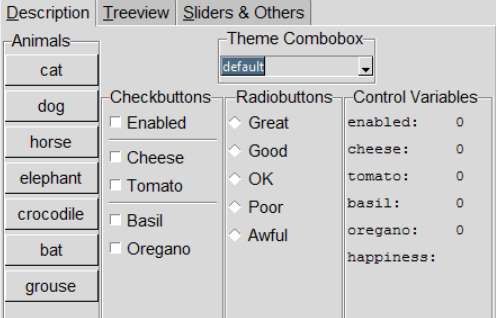
Let us refresh our memory of how a widget looks in the various themes, try 06theme_notebook.py, which has most of the important widgets together with a theme selector. It has been set up to incorporate ttkthemes. The first tab contains most of the normally used widgets, the second tab has a treeview with scrollbars, in order to see the scroll bars work it may be necessary to adjust the height and width using the sizegrip, the third tab has the scale and progress bars. Try using the checkbutton Enabled, this will change the state to disabled and back again for most of the widgets.
There may be widgets that appeal in different themes, it should be possible to mix and match to your taste provided that you copy widget definitions together with any referenced images.
Show/Hide Code 06theme_notebook.py
'''
collection of themed widgets

#! /usr/bin/env python
# based on example from py in the eye
'''
from tkinter import Tk, IntVar, StringVar, font
from tkinter.ttk import Frame, Notebook, Separator, Checkbutton, Button, \
Radiobutton, LabelFrame, Treeview,Scrollbar, Combobox, PanedWindow, Style, \
Progressbar, Sizegrip, Label, Entry, Spinbox
from tkinter.font import Font
from ttkthemes import themed_style as ts
from gen_scale_class import TtkScale

class NotebookDemo:

    def __init__(self, fr):

        self.fr = fr
        self.st0 = Style()
        self.style = ts.ThemedStyle() # Style()
        self._create_demo_panel() # run this before allBtns
        self.allBtns = self.ttkbut + self.cbs[1:] + self.rb

    def _create_demo_panel(self):
        demoPanel = Frame(self.fr, name="demo")
        demoPanel.pack(side='top', fill='both', expand='y')

        # create the notebook
        self.nb = nb = Notebook(demoPanel, name="nb")

        # extend bindings to top level window allowing
        #   CTRL+TAB - cycles thru tabs
        #   SHIFT+CTRL+TAB - previous tab
        #   ALT+K - select tab using mnemonic (K = underlined letter)
        nb.enable_traversal()
        nb.bind("<<NotebookTabChanged>>", self._on_tab_changed)
        nb.pack(fill='both', expand='y', padx=2, pady=3)
        self._create_descrip_tab(nb)
        self._create_treeview_tab(nb)
        self._create_text_tab(nb)

    def _create_descrip_tab(self, nb):
        # frame to hold contents
        frame = Frame(nb, name='descrip')

        # widgets to be displayed on 'Description' tab
        # position and set resize behaviour

        frame.rowconfigure(1, weight=1)
        frame.columnconfigure((0,1), weight=1, uniform=1)
        lf = LabelFrame(frame, text='Animals')
        lf.pack(pady=2,side='left',fill='y')
        themes = ['cat','dog','horse','elephant',
                  'crocodile','bat','grouse\nextra line made longer']
        self.ttkbut = []
        for t in themes:
            b = Button(lf, text=t)
            b.pack(pady=2)
            self.ttkbut.append(b)

        lF2 = LabelFrame(frame,text="Theme Combobox")
        lF2.pack(anchor='nw')
        themes = list(sorted(self.style.get_themes()))
        themes.insert(0, "Pick a theme")
        self.cb = cb = Combobox(lF2, values=themes, state="readonly", height=10)
        cb.set(themes[0])
        cb.bind('<<ComboboxSelected>>', self.change_style)
        cb.grid(row=0,column=0,sticky='nw', pady=5)

        lF3 = LabelFrame(frame,text="Entry")
        lF3.pack(anchor='ne')
        self.en = Entry(lF3)
        self.en.grid(row=0,column=0,sticky='ew', pady=5, padx=5)

        lf1 = LabelFrame(frame, text='Checkbuttons')
        lf1.pack(pady=2,side='left',fill='y')

        # control variables
        self.enabled = IntVar()
        self.cheese = IntVar()
        self.tomato = IntVar()
        self.basil = IntVar()
        self.oregano = IntVar()
        # checkbuttons
        self.cbOpt = Checkbutton(lf1, text='Enabled', variable=self.enabled,
                                 command=self._toggle_opt)
        self.cbCheese = cbCheese = Checkbutton(text='Cheese', variable=self.cheese,
                               command=self._show_vars)
        cbTomato = Checkbutton(text='Tomato', variable=self.tomato,
                               command=self._show_vars)
        sep1 = Separator(orient='h')
        cbBasil = Checkbutton(text='Basil', variable=self.basil,
                              command=self._show_vars)
        cbOregano = Checkbutton(text='Oregano', variable=self.oregano,
                                command=self._show_vars)
        sep2 = Separator(orient='h')

        self.cbs = [self.cbOpt, sep1, cbCheese, cbTomato, sep2, cbBasil,
                    cbOregano]
        for opt in self.cbs:
            if opt.winfo_class() == 'TCheckbutton':
                opt.configure(onvalue=1, offvalue=0)
                opt.setvar(opt.cget('variable'), 0)

            opt.pack(in_=lf1, side='top', fill='x', pady=2, padx=5, anchor='nw')

        lf2 = LabelFrame(frame, text='Radiobuttons', labelanchor='n')
        lf2.pack(pady=2,side='left',fill='y')

        self.rb=[]
        self.happiness = StringVar()
        for s in ['Great', 'Good', 'OK', 'Poor', 'Awful']:
            b = Radiobutton(lf2, text=s, value=s,
                                variable=self.happiness,
                                command=lambda s=s: self._show_vars())
            b.pack(anchor='nw', side='top', fill='x', pady=2)
            self.rb.append(b)

        right = LabelFrame(frame, text='Control Variables')
        right.pack(pady=2,side='left',fill='y')

        self.vb0 = Label(right, font=('Courier', 10))
        self.vb1 = Label(right, font=('Courier', 10))
        self.vb2 = Label(right, font=('Courier', 10))
        self.vb3 = Label(right, font=('Courier', 10))
        self.vb4 = Label(right, font=('Courier', 10))
        self.vb5 = Label(right, font=('Courier', 10))

        self.vb0.pack(anchor='nw', pady=3)
        self.vb1.pack(anchor='nw', pady=3)
        self.vb2.pack(anchor='nw', pady=3)
        self.vb3.pack(anchor='nw', pady=3)
        self.vb4.pack(anchor='nw', pady=3)
        self.vb5.pack(anchor='nw', pady=3)

        self._show_vars()
        # add to notebook (underline = index for short-cut character)
        nb.add(frame, text='Description', underline=0, padding=2)


    # =========================================================================
    def _create_treeview_tab(self, nb):
        # Populate the second pane. Note that the content doesn't really matter
        # tree = None
        self.backg = ["white",'#f0f0ff']
        tree_columns = ("country", "capital", "currency")
        tree_data = [
            ("Argentina",      "Buenos Aires",     "ARS"),
            ("Australia",      "Canberra",         "AUD"),
            ("Brazil",         "Brazilia",         "BRL"),
            ("Canada",         "Ottawa",           "CAD"),
            ("China",          "Beijing",          "CNY"),
            ("France",         "Paris",            "EUR"),
            ("Germany",        "Berlin",           "EUR"),
            ("India",          "New Delhi",        "INR"),
            ("Italy",          "Rome",             "EUR"),
            ("Japan",          "Tokyo",            "JPY"),
            ("Mexico",         "Mexico City",      "MXN"),
            ("Russia",         "Moscow",           "RUB"),
            ("South Africa",   "Pretoria",         "ZAR"),
            ("United Kingdom", "London",           "GBP"),
            ("United States",  "Washington, D.C.", "USD")
            ]

        #test_length = font.Font(family="Times", size=12, weight="bold").measure('Test')
        #fact = int(test_length / 30 * 20.45) # 30 is the length of Test in Idle
        fact = font.Font(font="TkDefaultFont").metrics('linespace')

        self.st0.configure('fact.Treeview', rowheight=fact,
                           font=font.nametofont("TkDefaultFont"))

        container = Frame(nb)
        container.grid(sticky='nsew') #(fill='both', expand=True)
        self.tree = Treeview(container, columns=tree_columns, show="headings",
                    style='fact.Treeview')
        vsb = Scrollbar(container, orient="vertical", command=self.tree.yview)
        hsb = Scrollbar(container, orient="horizontal", command=self.tree.xview)
        self.tree.configure(yscrollcommand=vsb.set, xscrollcommand=hsb.set)
        self.tree.grid(column=0, row=0, sticky='nsew', in_=container)
        vsb.grid(column=1, row=0, sticky='ns', in_=container)
        hsb.grid(column=0, row=1, sticky='ew', in_=container)

        container.grid_columnconfigure(0, weight=1)
        container.grid_rowconfigure(0, weight=1)

        for col in tree_columns:
            self.tree.heading(col, text=col.title(),
                command=lambda c=col: self.sortby(self.tree, c, 0))
            # XXX tkFont.Font().measure expected args are incorrect according
            #     to the Tk docs
            self.tree.column(col, width=Font().measure(col.title()),
                             stretch=False)

        for ix,item in enumerate(tree_data):
            itemID = self.tree.insert('', 'end', values=item)
            self.tree.item(itemID, tags=itemID)
            self.tree.tag_configure(itemID, background=self.backg[ix%2])

            # adjust columns lengths if necessary
            for indx, val in enumerate(item):
                ilen = Font().measure(val)
                if self.tree.column(tree_columns[indx], width=None) < ilen:
                    self.tree.column(tree_columns[indx], width=ilen)

        sg = Sizegrip(container)
        sg.grid(sticky='e')

        nb.add(container, text='Treeview', underline=0, padding=2)

    # =========================================================================
    def _create_text_tab(self, nb):
        # populate the third frame with other widgets
        self.pw = PanedWindow(nb, name = 'pw')
        self.pw.pack(fill='both', expand=True)

        lF = LabelFrame(self.pw,text="Slider")
        fr1 = Frame(lF)
        fr1.grid(row=0,column=0)
        from_=-5
        to=105
        value=19
        #step=11
        #fontSize = 9
        scvar = IntVar()
        #scRange=self.any_number_range(from_,to,step)
        #scLen = len(scRange[1]) * (fontSize + 10)

        self.sc = TtkScale(fr1, from_=from_, to=to, variable=scvar,
                    orient='vertical',length=200, showvalue=True,
                        command=lambda s: scvar.set('%d' % float(s) ),
                        tickinterval=5, resolution=5)
        #self.sc = Scale(fr1, from_=from_, to=to, variable=scvar,
                    #orient='vertical',length=scLen,
                        #command=lambda s: scvar.set('%d' % float(s) ))
        self.sc.set(value)
        #l1 = Label(fr1,textvariable=scvar,width=5)
        l1 = Spinbox(fr1, from_=from_, to=to, textvariable=scvar, width=4)
        l1.grid(row=0,column=0,pady=2)
        self.sc.grid(row=0,column=1, pady=5, padx=40)
        fr=Frame(fr1)
        fr.grid(row=0, column=2)
        #for ix,sR in enumerate(scRange[1]):
            #lb = Label(fr, text=sR, font=('Courier New', str(fontSize)))
            #lb.grid(row=ix, column=1)

        schvar = IntVar()
        a=-5
        b=105
        #schRange = self.any_number_range(a,b,s=11)
        #schLen = Font().measure(schRange[0])
        self.sch = TtkScale(lF, from_=a, to=b, length=200, variable=schvar,
                         orient='horizontal', showvalue=True,
                         command=lambda s: schvar.set('%d' % float(s) ),
                         tickinterval=5, resolution=5)
        #self.sch = Scale(lF, from_=a, to=b, length=schLen, variable=schvar,
                         #orient='horizontal',
                         #command=lambda s: schvar.set('%d' % float(s) ))
        self.sch.set(23)
        #l2 = Label(lF,textvariable=schvar)
        l2 = Spinbox(lF, from_=a, to=b, textvariable=schvar, width=4)
        l2.grid(row=1,column=1,pady=2)
        self.sch.grid(row=2,column=1, pady=40, padx=5,sticky='nw')
        #l3 = Label(lF,text=schRange[0], font=('Courier New', str(fontSize)))
        #l3.grid(row=3,column=1,pady=2)
        #self.sch.bind("<ButtonRelease-1>", self.show_x)
        self.pw.add(lF)

        lF1 = LabelFrame(self.pw,text="Progress", name = 'lf')
        pb1var = IntVar()
        pb2var = IntVar()
        self.pbar = Progressbar(lF1, variable = pb1var, length = 150,
                        mode ="indeterminate", name='pb1', orient='horizontal')
        self.pb2 = Progressbar(lF1, variable = pb2var, mode='indeterminate',
                               name='pb2', orient='vertical')
        self.pbar["value"] = 25
        self.pbar.grid(row=1,column=0,padx=5,pady=5,sticky='nw')
        self.pb2.grid(row=1,column=1,padx=5,pady=5,sticky='nw')
        l3 = Label(lF1,textvariable=pb1var)
        l3.grid(row=0,column=0,pady=2,sticky='nw')
        l4 = Label(lF1,textvariable=pb2var)
        l4.grid(row=0,column=1,pady=2,sticky='nw')
        start = Button(lF1, text='Start Progress',
                   command=lambda: self._do_bars('start'))
        stop = Button(lF1, text='Stop Progress',
                   command=lambda: self._do_bars('stop'))
        start.grid(row=2,column=0,padx=5,pady=5,sticky='nw')
        stop.grid(row=3,column=0,padx=5,pady=5,sticky='nw')
        self.pw.add(lF1)

        # add to notebook (underline = index for short-cut character)
        nb.add(self.pw, text='Sliders & Others', underline=0)

    #=========================================================================
    def _toggle_opt(self):
        # state of the option buttons controlled
        # by the state of the Option frame label widget
        if self.enabled.get() == 1:
            self.sc.state(['!disabled'])
            self.sch.state(['!disabled'])
            self.cb.state(['!disabled'])
            self.en.state(['!disabled'])
            self.pbar.state(['!disabled'])
            self.pb2.state(['!disabled'])
            print(self.cbCheese.state())
        else:
            self.sc.state(['disabled'])
            self.sch.state(['disabled'])
            self.cb.state(['disabled'])
            self.en.state(['disabled'])
            self.pbar.state(['disabled'])
            self.pb2.state(['disabled'])

        for opt in self.allBtns:
            if opt.winfo_class() != 'TSeparator':
                if self.cbOpt.instate(('selected', )):
                    opt['state'] = '!disabled'  # enable option
                    self.nb.tab(1, state='normal')
                else:
                    opt['state'] = 'disabled'
                    self.nb.tab(1, state='disabled')
        self._show_vars()

    def _show_vars(self):
        # set text for labels in var_panel to include the control
        # variable name and current variable value
        self.vb0['text'] = '{:<11} {:<8}'.format('enabled:', self.enabled.get())
        self.vb1['text'] = '{:<11} {:<8}'.format('cheese:', self.cheese.get())
        self.vb2['text'] = '{:<11} {:<8}'.format('tomato:', self.tomato.get())
        self.vb3['text'] = '{:<11} {:<8}'.format('basil:', self.basil.get())
        self.vb4['text'] = '{:<11} {:<8}'.format('oregano:', self.oregano.get())
        self.vb5['text'] = '{:<11} {:<8}'.format('happiness:',
                self.happiness.get())

    def sortby(self, tree, col, descending):
        """Sort tree contents when a column is clicked on."""
        # grab values to sort
        data = [(tree.set(child, col), child) for child in tree.get_children('')]

        # reorder data
        data.sort(reverse=descending)
        for indx, item in enumerate(data):
            tree.move(item[1], '', indx)

        # switch the heading so that it will sort in the opposite direction
        tree.heading(col,
            command=lambda col=col: self.sortby(tree, col, int(not descending)))
        # reconfigure tags after ordering
        list_of_items = tree.get_children('')
        for i in range(len(list_of_items)):
            tree.tag_configure(list_of_items[i], background=self.backg[i%2])

    def any_number_range(self,a,b,s=1):
        """ Generate consecutive values list between two numbers with optional
        step (default=1)."""
        if (a == b):
            return a
        else:
            mx = max(a,b)
            mn = min(a,b)
            result = []
            output = ''
            # inclusive upper limit. If not needed, delete '+1' in the line
            #below
            while(mn < mx + 1):
                # if step is positive we go from min to max
                if s > 0:
                    result.append(mn)
                    mn += s
                # if step is negative we go from max to min
                if s < 0:
                    result.append(mx)
                    mx += s
                # val
            maxLen = 0
            output = ""
            for ix,res in enumerate(result[:-1]): # last value ignored
                if len(str(res)) > maxLen:
                    maxLen = len(str(res))
            if maxLen == 1:
                # converts list to string
                output = ' '.join(str(i) for i in result)
            else:
                for ix, res in enumerate(result):
                    if maxLen == 2:
                        if len(str(res)) == 1:
                            output = output + str(res) + " " * maxLen
                        elif len(str(res)) == 2:
                            output = output + str(res) + " "
                        else:
                            output = output + str(res)

            return output,result

    def _do_bars(self, op):
        pbar = self.pbar.nametowidget('.fr.demo.nb.pw.lf.pb1')
        pb2 = self.pb2.nametowidget('.fr.demo.nb.pw.lf.pb2')

        if op == 'start':
            pbar.start()
            pb2.start()
        else:
            pbar.stop()
            pb2.stop()

    def change_style(self, event=None):
        """set the Style to the content of the Combobox"""
        content = self.cb.get()
        try:
            self.style.theme_use(content)
            fact = font.Font(font="TkDefaultFont").metrics('linespace')
            self.st0.configure('font.Treeview', rowheight=fact,
              font=font.nametofont("TkDefaultFont"))
        except TclError as err:
            messagebox.showerror('Error', err)
        else:
            root.title(content)

    def change_theme(self,theme):
        window = ttktheme.ThemedTk()
        window.set_theme(theme)
        root.title(theme)

    def _on_tab_changed(self,event):
        event.widget.update_idletasks()

        tab = event.widget.nametowidget(event.widget.select())
        event.widget.configure(height=tab.winfo_reqheight(),width=tab.winfo_reqwidth())

    #========================================================================
if __name__ == '__main__':
    root = Tk()

    #root.geometry("{}x{}+{}+{}".format(w, h, x, y))
    #root.geometry("{}x{}+{}+{}".format(400, 440, 70, 100))
    f = Frame(root,name="fr")
    f.pack(fill='both', expand='y')
    NotebookDemo(f)
    root.mainloop()