

Antialiasing#
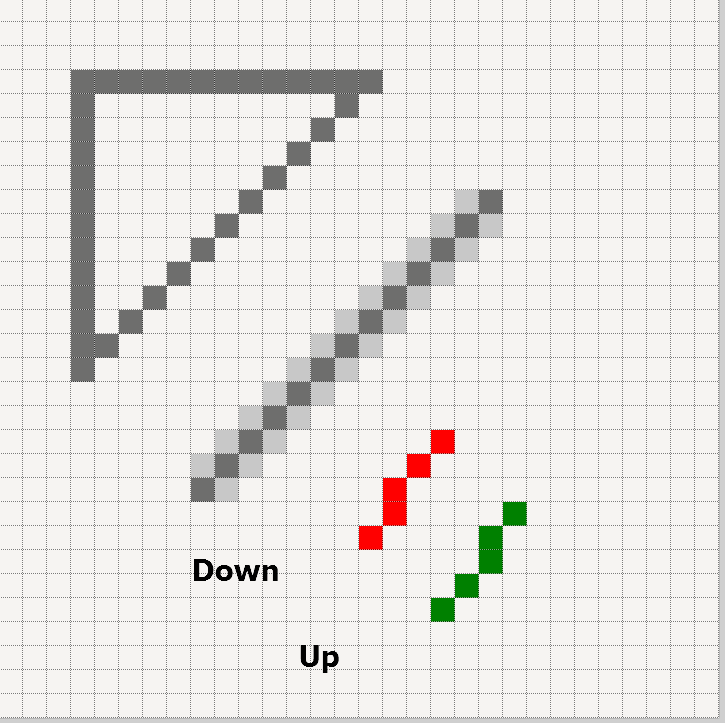
Lines and Antialiasing#
The vertical and horizontal lines are smooth, but the diagonal line, drawn as is, is jagged (aliased) or antialiased. Antialised lines have pixels, with a colour between the line and background colour, placed next to the line pixels.
There are several approaches we may use to perform antialiasing. The one used is based upon drawing the image several times larger, then resize to the required size whilst applying a resampling filter. This creates differently coloured pixels, as exist in comboarrow-n.png.
Apply this to an enlarged image of two lines joined by a diagonal say, then resize with a filter, antialias pixels are made but these are not as intense as in the original image. Colour is equalized between adjacent darker and lighter colours, noticeably around the line ends.
Later on it will be shown that the corners can have intensified antialiasing by reproducing the image at a larger size, say nine times larger, make real corners (not just drawing wide diagonals), then reduce the image size while applying a resampling filter. The antialias pixels are now compressing corners into these few pixels, making them more intense and believable.
Unfortunately the arrow has no such aid.