

Piratz Combobox#
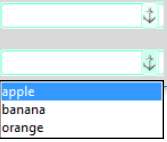
Take combobox next, it is best not to alter this too much - since we need to incorporate a drop down list - so let's use the images from ubuntu. Remember ubuntu uses png, which is easier to manipulate than gif within PIL. We can see that ubuntu uses theme create without layout.
Show/Hide Code 07pirate_combobox.py
# both theme_create and theme_settings worked
#style.theme_create( "yummy", parent="clam", settings={
style.theme_settings('alt', {
# start of theme extract
     "Combobox.field": {"element create":
           ("image", 'combo-n',
                ('readonly', 'disabled', 'combo-rd'),
                ('readonly', 'pressed', 'combo-rp'),
                ('readonly', 'focus', 'combo-rf'),
                ('readonly',  'combo-rn'),
                {'sticky': 'ew',  'border': [4]}
           )
        },
        "Combobox.downarrow": {"element create":
            ("image", 'comboarrow-n',
                 ('disabled','comboarrow-d'),
                 ('pressed','comboarrow-p'),
                 ('active','comboarrow-a'),
                 {'sticky': '','border': [1]}
             )
        }

# end of theme extract - don't forget to add comma at end when inserting
     })

style.theme_use('alt') # 'yummy'
sv = StringVar()
widg = Combobox(fr,values=['apple', 'banana', 'orange'], textvariable=sv)
widg.grid(column=0,row=18,padx=5,pady=5 )
sv.set('first')
sv1 = StringVar()
widg1 = Combobox(fr,values=['apple', 'banana', 'orange'], textvariable=sv1)
widg1.grid(column=0,row=19,padx=5,pady=5,sticky='ns')
sv1.set('second really really long')
run_state(fr,widg,widg1)

root.mainloop()