

Progressbar and Scale#
Piratz Progressbar |
Piratz Scale |
|---|---|
|
|
The last two widgets are on the face of it not particularly exciting. Check out how a progressbar and scale work Themed notebook. Not exactly gripping stuff is it?
Default Progressbar |
Default Scale |
|---|---|
|
|


Progressbar#
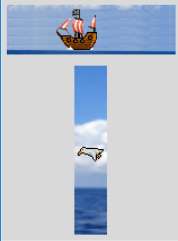
However with a bit of thought we can "improve" these somewhat. I'm no artist, so the graphics come from the game funny boat.The horizontal progressbar is a pirate ship sailing left to right, all we need is to detect the value then use this to trigger another state just as the value reaches 100. Use the "after" universal widget function that fires after a time delay and calls a customised function steer() which checks on the widget value, if it reaches 100 it changes the state and the direction flag. When the value reaches 0 it changes back to the original state and direction flag. The states in element_create and the customised function need compound states that have a negative second state as well as the called state, we are cancelling out the active state when we call the background state and vice versa. The function steer is shown below:
dir0 = 1
dir1 = 1
def steer():
   global dir0
   widg['value'] += 1 * dir0
   if widg['value'] == 100:
      widg.state(['background','!active'])
      dir0 = -1
      widg.after(50, steer)
   elif widg['value'] == 0:
      widg.state(['active','!background'])
      dir0 = 1
      widg.after(50, steer)
   else:
      widg.after(50, steer)
Since the trough can also be an image we make it a tropical seascape.
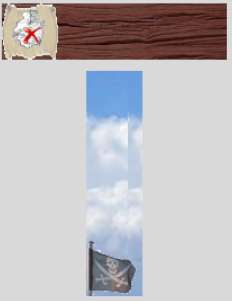
The vertical progressbar is slightly more complicated as we have a flapping seagull, therefore we require 3 states, and each state has to include both the other two negative states. Run both progressbars in "indeterminate" mode and make the length the same as your trough image.
Show/Hide Code 07pirate_progressbar.py
# both theme_create and theme_settings worked
style.theme_create( "yummy", parent="clam", settings={
#style.theme_settings('default', {
# start of theme extract
     'Horizontal.Progressbar.trough': {"element create":
          ('image', "trough-pbar-horiz",
           {'border':4})},
     'Horizontal.Progressbar.pbar': {"element create":
          ('image', "pbar-boat-a",
           ('background', '!active', "pbar-boat-b"),
           {'border':[2, 9]})
        },
     'Vertical.Progressbar.trough': {"element create":
          ('image', "trough-pbar-vert",
           {'border':3})},
     'Vertical.Progressbar.pbar': {"element create":
          ('image', "pbar-gull-a",
           ('background', '!active', '!invalid', "pbar-gull-b"),
           ('invalid', '!active', '!background', "pbar-gull-b"),
           {'border':[9, 2]})
        }
# end of theme extract - don't forget to add comma at end when inserting
     })

style.theme_use('yummy') # 'default'
test_size = font.Font(family="Times", size=12, weight="bold").measure('Test')
mult = int(test_size / 30)
widg = Progressbar(fr,length=150*mult,orient='horizontal',mode='indeterminate')
widg.grid(column=0,row=0,sticky='nsew', padx=5, pady=5)
steer()

widg1 = Progressbar(fr,length=150*mult,orient='vertical',mode='indeterminate')
widg1.grid(column=0,row=2, padx=5, pady=5)
steer1()

root.mainloop()
Scale#
In the scale widget we have a similar situation to progressbar but we can use
the command property to trigger our external function, which simplifies
matters somewhat, we need only to concentrate on obtaining the scale value
then trigger the state changes at pre-determined settings. The horizontal
scale has several states not only for the slider but the trough as well.
This makes the state calls more interesting than usual. When calling a state
remember to cancel the other states.
Show/Hide Code 07pirate_scale.py
# both theme_create and theme_settings worked
style.theme_create( "yummy", parent="clam", settings={
#style.theme_settings('default', {
# start of theme extract
     'Horizontal.Scale.trough': {"element create":
          ('image', "trough-tabletop",
           ('background', 'trough-beach'),
           ('focus', 'trough-beach'),
           ('invalid', 'trough-beach'),
           ('readonly', 'trough-sea'),
           ('selected', 'trough-sea')
           )},
     'Horizontal.Scale.slider': {"element create":
          ('image', "slider-horiz-map",
           ('background', "slider-horiz-c-chest"),
           ('invalid', "slider-horiz-o-chest"),
           ('focus', 'slider-horiz-ben'),
           ('readonly', 'slider-horiz-wheel'),
           ('selected', 'slider-horiz-wheelp'),
           {'border':3})
        },
     'Vertical.Scale.trough': {"element create":
          ('image', "trough-scale-vert",
           )},
     'Vertical.Scale.slider': {"element create":
          ('image', "slider-s-vert",
           ('background', "slider-s-vert-b"),
           ('invalid', "slider-s-vert-i"),
           ('selected', 'slider-s-vert-s'),
           {'border':3})
        }
# end of theme extract - don't forget to add comma at end when inserting
     })

style.theme_use('yummy') # 'default'
widg = Scale(fr,from_=0, to=100, length=200,orient='horizontal',command=slide_move)
widg.grid(column=0,row=0,sticky='nsew', padx=5, pady=5)

widg1 = Scale(fr,from_=100, to=0, length=200,orient='vertical',command=slide_vert)
widg1.grid(column=0,row=2, padx=5, pady=5)


root.mainloop()

'''
,
     'Vertical.Progressbar.trough': {"element create":
          ('image', "trough-pbar-vert",
           {'border':3})},
     'Vertical.Progressbar.pbar': {"element create":
          ('image', "pbar-gull-a",
           ('background', '!active', '!invalid', "pbar-gull-b"),
           ('invalid', '!active', '!background', "pbar-gull-b"),
           {'border':[9, 2]})
        }
'''
Alright we needed customised functions but I think it a small price to pay - or else you would need to build customised widgets and that is another ballgame entirely.