

Notebook and Treeview#
Notebook  Treeview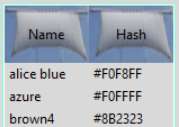
Notebook#
Try this with and without the optional map. If we did not have images the tab would have moved. You could experiment with different sized images to give the same effect.
Show/Hide Code 07pirate_notebook.py
# both theme_create and theme_settings worked
style.theme_create( "yummy", parent="clam", settings={
#style.theme_settings('default', {
# start of theme extract
    'TNotebook.tab': {"map":
        {'expand': [('selected', [6,6,6,6])]}}, # 2,7,5,5

     'tab': {"element create":
          ('image', "sail",
           ('pressed', "sail-p"),
           ('selected', "sail-s"),
           ('disabled', "sail-d"),
           {'border':[30, 17, 27, 32], 'padding':[13,8,12,13], 'sticky': "nsew"} #
        ) },
       'TNotebook': {'configure': {'bordercolor': colours['bordercolor'],
                                   'tabmargins':[6,6,6,6]}}

# end of theme extract - don't forget to add comma at end when inserting
     })

style.theme_use('yummy') # 'default'
test_size = font.Font(family="Times", size=12, weight="bold").measure('Test')
mult = int(test_size / 30)
widg = Notebook(fr)
page1 = Frame(widg, width=150*mult, height=150*mult)
page2 = Frame(widg, width=150*mult, height=150*mult)
widg.add(page1,text='Piratz!')
widg.add(page2,text='Piratz!\nextra longish line\nor two')
widg.grid(column=0,row=18,sticky='nsew', padx=5, pady=15)
run_state(fr,widg)

root.mainloop()
Treeview#
The widgets notebook and treeview both use sails for their tabs, the adjustment of the border and padding was a little tricky, but followed along the lines already developed for label. Treeview had used a bordercolor with an alias name, so do not forget to set this up in the piratz_theme.py.
colors = {'bordercolor': '#7FFFD4'}
Select a row, it does not show, we have to make the selection highlight
the row. We have not covered this yet, check the plastik theme.
### extract from plastik_theme ###
# added map to treeview for selection
     "Treeview": {"configure": {"padding": 0},
      "map": {"background": [("selected", colors["selectbg"])],
         "foreground": [("selected", colors["selectfg"])]}
   },
enlarge colors to include background and foreground:
colors = {'bordercolor': '#7FFFD4',
         "selectbg": "#2d2d66",
         "selectfg": "#ffffff"}
Treeview required a map command to create the selected row, together
with two additional colours.
Show/Hide Code 07pirate_treeview.py
fact = font.Font(font="TkDefaultFont").metrics('linespace')
style.configure('font.Treeview', rowheight=fact,
              font=font.nametofont("TkDefaultFont"))
test_size = font.Font(family="Times", size=12, weight="bold").measure('Test')
mult = int(test_size / 30)
# both theme_create and theme_settings worked
style.theme_create( "yummy", parent="clam", settings={
#style.theme_settings('default', {
# start of theme extract
     'Treeheading.cell': {"element create":
          ('image', "sail",
           ('selected', "sail-s"),
           ('disabled', "sail-d"),
           ('pressed', "sail-s"),
           ('active', "sail-p"),
           {'border':[30, 17, 27, 32], 'padding':[13,8,18,21], 'sticky': "nsew"}
        ) },
       # added map to treeview for selection
       'Treeview': {'configure': {'bordercolor': colors['bordercolor']},
          "map": {"background": [("selected", colors["selectbg"])],
            "foreground": [("selected", colors["selectfg"])]}},

# end of theme extract - don't forget to add comma at end when inserting
     })

style.theme_use('yummy') # 'default'
dataCols = ('Name', 'hash')
treeData = (('alice blue', '#F0F8FF'),('azure', '#F0FFFF'), ('brown4', '#8B2323'))
widg = Treeview(fr, columns=dataCols, show='headings',height=6*mult,
                style='font.Treeview')
for col in dataCols:
    widg.heading(col, text=col.title())
    widg.column(col, width=75*mult)
for ix, item in enumerate(treeData):
    widg.insert('', 'end', values=item)
widg.grid(column=0,row=18,sticky='nsew', padx=5, pady=5)
run_state(fr,widg)

root.mainloop()