

Piratz Scrollbar#
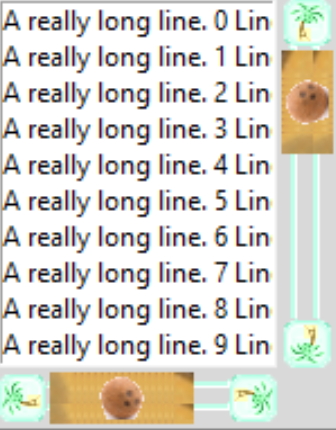
Looking at the scrollbars next, they have components which will change with orientation, so together with changes of state there are quite a few images used. 07pirate_scrollbar.py is the original script. I like the images from ubuntu so we can change their colours to aquamarine and subsititute the coconut tree from pirate_label for the arrows (steppers). The thumb image is a coconut, so for the first attempt there was no grip.
The trough has been copied from elegance, with a colour change, this shows how the trough can be created from an image. Ubuntu used the trough from the parent theme and changed its colour with a configure command - obviously both approaches are equally valid, but the image can give more flexibility.
Since there are changes to the arrangement compared to the parent theme we will need a layout, which will need to be copied and changed as appropriate for the other orientation. It is important that the thumb component has the element "expand" set to True or 1, otherwise the thumb cannot be moved using the mouse - this in turn means that the thumb will no longer remain circular but becomes oval. The original script is available.
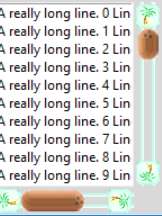
Just as it was necessary to set the border limits in pirate_label so thumb needs to have its border set (try experimenting with a border of 1). An oval coconut is not really what we want, we can keep it circular if we change the layout slightly - borrowed from the plastik theme - utilise a thumb and grip, the grip is our coconut and the thumb is a beach, as in the first script the thumb expands and has differing states, but the grip only changes between vertical and horizontal orientations. If you want you can uncomment out the third arrow in the layout in this script.
The flexibility of the tkinter theme is shown to its full limits - quite impressive.
Show/Hide Code 07pirate_scrollbar_grip.py
# both theme_create and theme_settings worked
style.theme_create( "yummy", parent="clam", settings={
#style.theme_settings('default', {
# start of theme extract
        "Horizontal.TScrollbar": {"layout": [
            ("Horizontal.Scrollbar.leftarrow", {"side": "left", "sticky": ''}),
            ("Horizontal.Scrollbar.rightarrow",
                {"side": "right", "sticky": ''}),
            #("Horizontal.Scrollbar.leftarrow",
                #{"side": "right", "sticky": ''}),
            ("Horizontal.Scrollbar.trough", {"sticky": "ew", "children":
                [("Horizontal.Scrollbar.thumb", {"expand": 1, "unit": 1,
                    "children": [("Horizontal.Scrollbar.grip", {"sticky": ''})]
                })]
            })]},

        "Horizontal.Scrollbar.thumb": {"element create":
            ("image", 'hthumb-n',
             ('disabled', 'hthumb-d'),
             ('pressed', 'hthumb-a'),
             ('active', 'hthumb-a'),
             {"border": [9,2]}) #3 , 'sticky': 'ew', 'padding': [7,2]
        },

        "Horizontal.Scrollbar.grip": {"element create": ("image", 'hgrip')},

        "Horizontal.Scrollbar.trough": {"element create":
            ('image', 'trough-horiz',
             {"border": 2, 'width': 32, 'height':21})},

        'Scrollbar.leftarrow': {"element create":
            ("image", 'arrowleft-n',
             ('disabled', 'arrowleft-d'),
             ('pressed', 'arrowleft-p'),
             ('active', 'arrowleft-a'),
             {"border": 1})
            },

        'Scrollbar.rightarrow': {"element create":
            ("image", 'arrowright-n',
             ('disabled', 'arrowright-d'),
             ('pressed', 'arrowright-p'),
             ('active', 'arrowright-a'),
             {"border": 1})
            },

        "Vertical.TScrollbar": {"layout": [
            ("Vertical.Scrollbar.uparrow", {"side": "top", "sticky": ''}),
            ("Vertical.Scrollbar.downarrow", {"side": "bottom", "sticky": ''}),
            #("Vertical.Scrollbar.uparrow", {"side": "bottom", "sticky": ''}),
            ("Vertical.Scrollbar.trough", {"sticky": "ns", "children":
                [("Vertical.Scrollbar.thumb", {"expand": 1, "unit": 1,
                    "children": [("Vertical.Scrollbar.grip", {"sticky": ''})]
                })]
            })]}, # "side": "top",

        "Vertical.Scrollbar.thumb": {"element create":
            ("image", 'vthumb-n',
             ('disabled', 'vthumb-d'),
             ('pressed', 'vthumb-a'),
             ('active', 'vthumb-a'),
             {"border": [2,9]})
        },

        "Vertical.Scrollbar.grip": {"element create": ("image", 'vgrip')},

        "Vertical.Scrollbar.trough": {"element create":
            ('image', 'trough-vert',
             {"border": 2, 'width': 21, 'height':32})},

        'Scrollbar.uparrow': {"element create":
            ("image", 'arrowup-n',
             ('disabled', 'arrowup-d'),
             ('pressed', 'arrowup-p'),
             ('active', 'arrowup-a'),
             {"border": 1})
            },

        'Scrollbar.downarrow': {"element create":
            ("image", 'arrowdown-n',
             ('disabled', 'arrowdown-d'),
             ('pressed', 'arrowdown-p'),
             ('active', 'arrowdown-a'),
             {"border": 1})
            }

# end of theme extract - don't forget to add comma at end when inserting
     })

style.theme_use('yummy') # 'default'

fr1 = Frame(fr,height=250,width=250)
fr1.grid(column=0,row=14,sticky='nsew')

widg = Scrollbar(fr1, orient="vertical")
widg1 = Scrollbar(fr1, orient="horizontal")
mylist = Listbox(fr1)
for line in range(100):
    mylist.insert('end', "A really long line. "+ str(line)+" Line number " )

mylist.grid( column=0,row=0)

widg.grid(column=1,row=0,sticky='ns')
widg.configure( command = mylist.yview )

widg1.grid(column=0,row=1,sticky='ew')
widg1.configure( command = mylist.xview )
mylist.configure(yscrollcommand = widg.set, xscrollcommand = widg1.set)
run_state(fr,widg,widg1)

root.mainloop()